Scammers know your guests’ bookings. Let guests check it’s really you.
Fake “hotel” messages quote the guest’s real name, dates and booking number, then ask for a card payment. With Hongi Anyone, a guest checks that it really is your hotel before paying, with two codes only the real hotel can produce.
Hongi Anyone is live · free for your guests · no guest data reaches your hotel
Dear Ms Janssens, your stay of 14–16 November (booking 4821 337) will be cancelled unless you confirm your card within 24 hours:
secure-booking-confirm.exampleBefore I pay anything: read me your Hongi code.
No code, no payment.
Why “check the details” stopped working
The details are real
Name, dates, room type, booking number: taken from a hijacked booking-platform account or a leak. Every fact the guest could check is correct.
It arrives where guests trust it
In the booking platform’s own chat, on WhatsApp, or by email from an address that looks like yours. The guest has no reason to doubt the channel.
Deadline and a payment link
“Confirm within 24 hours or lose the room.” The pressure works, and the money goes to the scammer, not to you.
Three ways your hotel’s name gets borrowed, and what answers each
Payment link in the booking chat
Your card was declined. Confirm it via this link or your booking will be cancelled.
The guest finds your hotel in the free Hongi app and calls you on the number in your listing. They read their code, reception reads yours back, and their phone confirms it. No code, no payment.
A call from “reception” before arrival
Good morning, this is the front desk. We need your card details again to guarantee your room.
The guest asks for a check during the call. The scammer can’t produce your code, however much they know about the booking.
Repeat and corporate guests
It’s the travel manager. Move the group to next week and send the invoice to this new address.
Pair once with the companies and regulars you know by name. Your staff read first; the client’s code proves it is really them before you change a booking or an invoice.
Added once. Checked whenever something feels off.
The guest reads first; your reception answers. Your hotel never learns who the guest is.
The guest adds your hotel, once
In the free Hongi app, by searching your name. Your listing shows your proven web domain and your official phone numbers. No account, no booking data.
In doubt, they read their code
The 6-digit code on their phone. Reception types it into the Hongi portal, which finds the pairing without learning who the guest is.
The guest speaks firstReception reads your code back
If it matches, the guest’s phone confirms it is your hotel. If not, it tells them to stop and shows how to reach you.
Then your reception
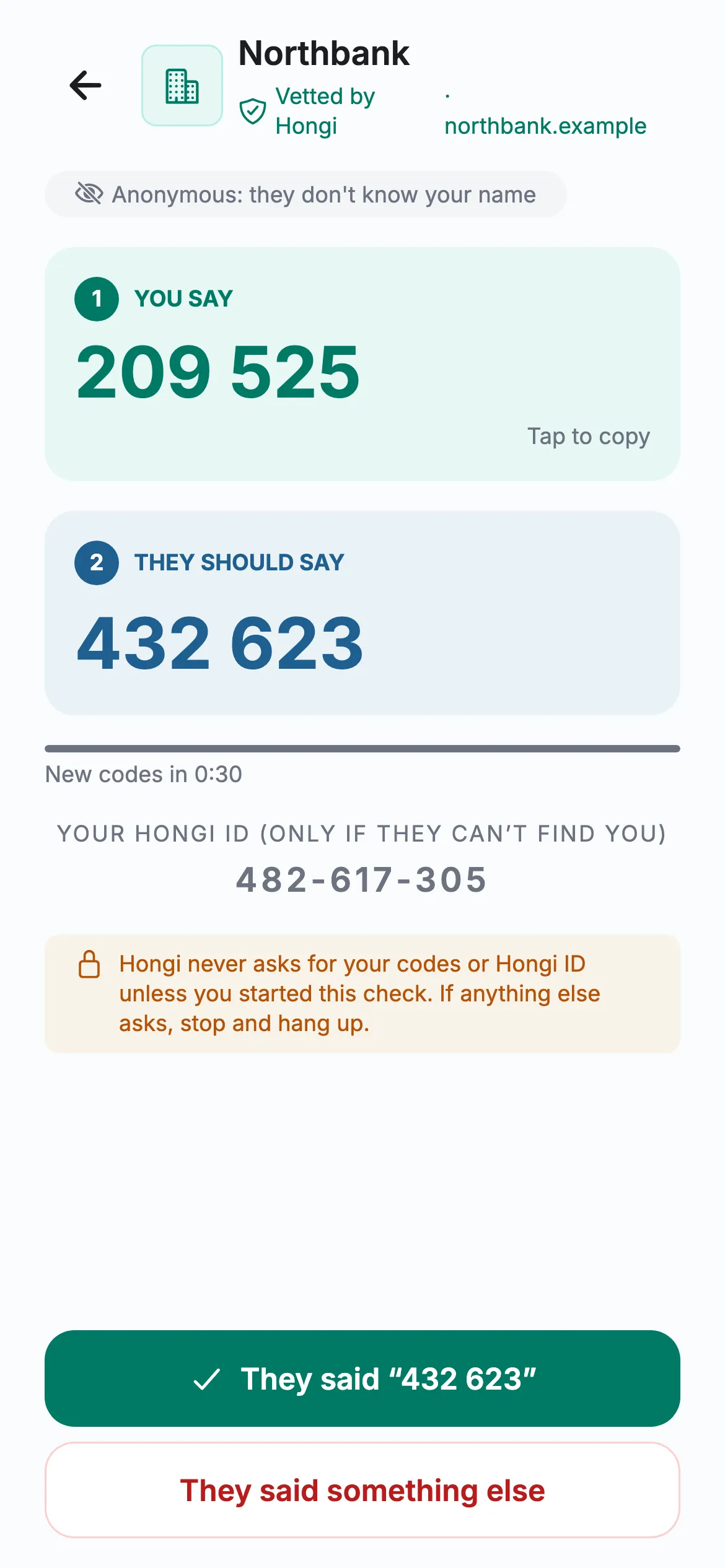
- 1The guest reads209 525 Reception types it in.
- 2Reception reads back432 623 The guest’s phone checks it.
Codes change every 30 seconds. Hongi never asks anyone for their code outside the app.
A real Hongi screen with a fictional organisation
A guest checks it’s really your hotel before paying
Teal shirts work at the hotel. The hooded figure is an impostor. Everyone else is a guest.
- Step 1 of 2Verified
A guest calls reception before paying
The guest reads their code first. Reception types it in and reads the hotel’s code back, and the guest’s phone confirms it.
- Step 2 of 2Impostor
A fake “reception” asks for card details
The scammer knows the booking but can’t produce the hotel’s code. The guest hangs up.
Put one line in every booking confirmation
Guests won’t install an app for one stay unless something tells them to, at the moment they need it. This line does, and it gives your staff one answer for every worried guest.
- Booking confirmation and pre-arrival email
- The contact page of your website
- Your listing text on booking platforms
- A card at reception and in the room
We will never ask you to pay or to share card details through a message or a link. In doubt? Open the free Hongi app, search for our hotel and call us on the number shown there. We’ll read you our code.
Tell guests to search for you in the app, never to follow a link to it. A link in a message is exactly what a scammer can fake.
What your team does
“Verify a caller”: type the code the guest reads, then read yours back. In the browser, nothing to install. Give the Agent role to everyone who answers the phone or the booking chat.
Keep the listing current: logo, description and official numbers, each reviewed by Hongi before it shows. See how many guests paired and checked over 30 days.
No new guest database, and no false promises
After a leak, the last thing a hotel needs is another place where guest data sits.
- That a paired phone came back, never whose it is
- Never: the guest’s name, number, contacts or booking
- How many pairs, codes and checks there were
- Hongi doesn’t stop someone taking over your booking-platform account. It makes the details they steal useless for proving they are you.
- Someone who relays codes between two conversations within 30 seconds can pass a check. For payments, the guest calls the number in your listing: on a call they place themselves, nobody sits in between.
- It only helps guests who have the free app. That is why the line in your confirmation matters.
Hongi for hotels, answered
Do our guests need an account?
No. They install the free app and add your hotel once. They don’t create an account, and you never learn their name, number or contacts.
Does reception need the app?
No. Reception verifies in the Hongi portal in a browser. If you switch it on, staff can also verify from the Hongi app with a work account.
Does it replace the booking platform’s messages?
No. Keep using your channels. Hongi adds a check guests can ask for when a message or call asks for money or card details.
What does a listing need?
Proof that you control your website’s domain (a DNS record or a file on your website), an editorial review by Hongi, and your logo and official numbers, which Hongi reviews too.
We are a group with several hotels.
Tell us in your request, with the hotels and their official numbers. We work out the listing with you.
Make your guests’ leaked data worthless to scammers.
Apply for a listing and we take you through the domain proof and the review. Or email info@hongi.io.